

What is production execution?

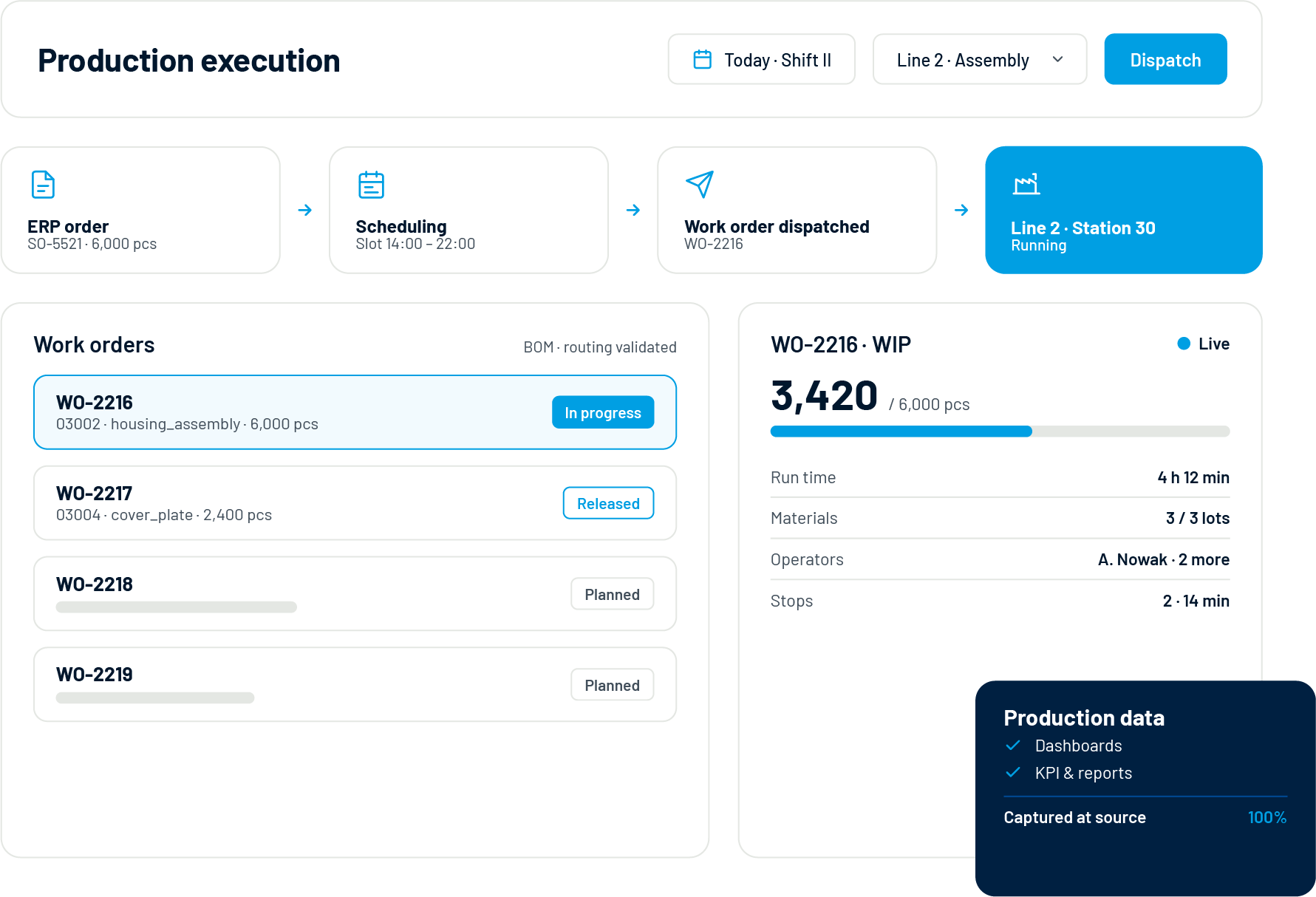
Produktionsausführung is the layer between planning and machines: it takes production orders from ERP or scheduling, dispatches them as work orders to lines and workstations, and tracks what actually happens – quantities, times, materials, people, stops. In the ISA-95 model it is the heart of MES: shop floor control that turns a plan into product, and raw events into structured production data.

Accevo’s production execution software manages the full work order lifecycle with BOM and routing validation, real-time WIP visibility and labor tracking. Because every event is captured at the source, the same module doubles as production management software for the analytics side: every dashboard, KPI and report reads from execution data that is already complete and already correct.

The work order lifecycle, end to end

Work order management software earns its keep by removing the gaps between planning, execution and reporting. In Accevo, one order flows through four stages without re-entry.

01

Create & import

Orders arrive from ERP or production scheduling software with BOMs, routings and due dates attached – or are created directly for unplanned work.

02

Dispatch & sequence

Orders are dispatched to lines and workstations in the planned sequence. Operators see their queue on the panel; supervisors see the whole floor.

03

Execute & track

Start, report, and complete operations with material consumption, labor tracking and quality checks captured in real time – shop floor tracking as a by-product of working.

04

Report & close

Good and bad quantities, scrap reasons, work logs and WIP status flow back to ERP automatically. The order closes with its full history attached.

BOM, routing and real-time shop floor tracking

Execution is only reliable when the system knows what should happen – and notices when it does not. Shop floor control software needs three things wired together:

BOM & routing management

Bill of materials and routings define the correct materials, operations and sequence for every product. BOM validation blocks wrong components before they reach the line, with alternative BOMs and routings supported.

Real-time WIP visibility

Work-in-progress is tracked by order, operation and workstation – so “where is order 4711?” is a glance at a screen, not a walk around the plant with a clipboard.

Labor & material reporting

Work logs record who worked on which machine and for how long; material consumption is reported per operation. Both feed costing, ERP backflushing and the performance analytics on this page.

5%

typical OEE improvement from removing stops and waste

15%

productivity gain after production digitalization at Alkaloid

100+

machines monitored in real time at a single site

0

spreadsheets between the shop floor and your reports

Manufacturing dashboards & KPI monitoring

The analytics half of the module: manufacturing dashboards that read directly from execution data. Real-time analytics for the control room, management reports for the morning meeting – one source, every audience.

Real-time production dashboard

Live OEE, availability, performance, quality and production progress for the whole factory or one line, machine, shift, order or product. Drill from the factory KPI to the workcenter behind it in two clicks.

Custom KPI configuration

There is no single way to measure every process. Define your own OEE calculation approach, custom production KPIs, TEEP and availability rules – so every team analyses performance on one consistent basis.

Shift & management reports

Automatic shift reports for handovers, daily and weekly management reports for reviews – production reports generated on schedule with OEE, losses, trends and comparisons, not assembled by hand on Monday morning.

Role-based views

Operators see their line, supervisors their area, plant management the site, group management every site. Same data model, each role sees what it decides on.

Mobile & remote access

Web-based data visualization on any device: check the real-time production dashboard from the office, home or another plant – and TV visualization for the shop floor itself.

Manufacturing BI & export

Export to CSV and Excel, schedule recurring reports, or connect Power BI and your business intelligence stack via API – production BI on live data instead of last week’s extract.

Find the loss behind the number

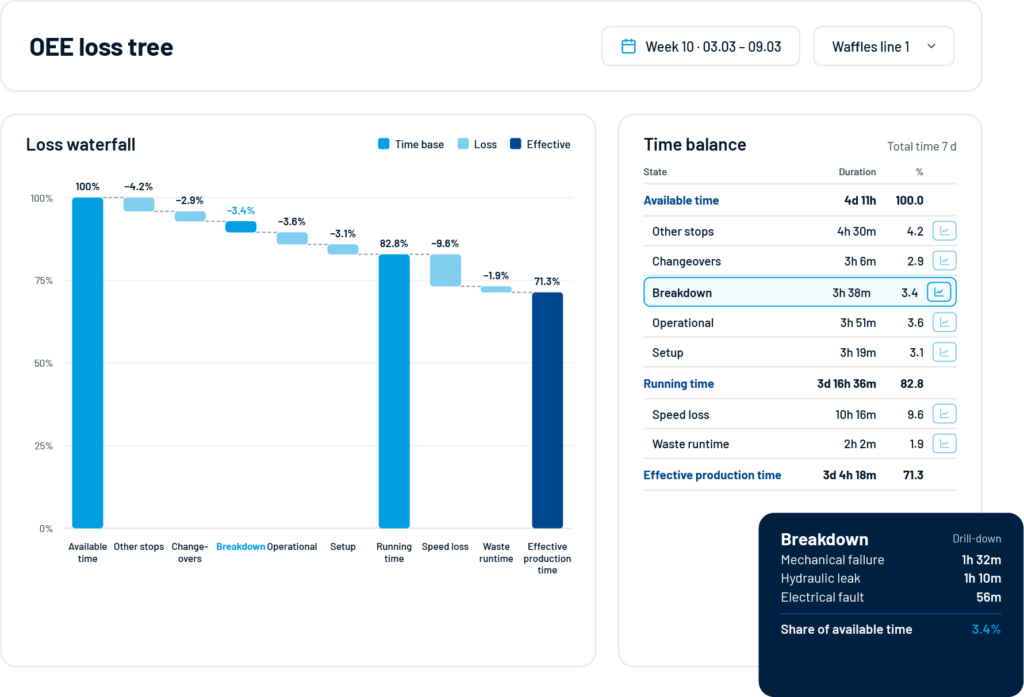
An OEE result tells you that performance changed. To improve it, you need to know why. Accevo breaks the result down through an OEE loss tree – time, speed and quality losses – then lets you investigate the events behind each branch: unplanned stops by category, actual speed and cycle-time deviations by operation or equipment, rejects by product and component, and changeover durations compared across lines, products and orders. Because analytics and execution share one data model, every loss links back to the exact order, shift and machine where it happened – production reporting software that ends arguments instead of starting them.

Cloud-MES vs. On-Premise-MES: Ein ehrlicher Vergleich

Standard definitions

work for standard processes. OEE according to the textbook – availability x performance x quality – plus TEEP for capacity discussions, calculated identically across every line.

Out of the box:

Your methodology

matters when product type, production flow, planning rules, quality checks or internal reporting standards do not fit the textbook. Accevo adapts KPI calculation to the way your factory manages performance.

Configured for you:

Ask AI about the reason behind the result

When production performance changes, teams need answers, not only charts. With AI-supported analysis, users ask questions about production results directly: “Why did OEE drop on this line?” starts from the result and asks what changed. “What caused the biggest loss?” investigates stop reasons, speed loss, reject categories and orders. “What should we check first?” guides the next question using available production data and KPI definitions. The quality of the answer depends on the execution data in the system – which is exactly why analytics belongs on the same platform that runs the work orders.

Integration with ERP, planning and MES data

Execution and analytics sit between your business systems and your machines. Data flows both ways, in real time, aligned with the ISA-95 model.

ERP

Production orders, BOMs, routings and personnel come in from SAP, Microsoft, Oracle, Infor or Comarch. Progress, scrap, consumption and work logs flow back automatically for costing and stock.

Planning (APS)

Optimized sequences arrive from production scheduling software; real execution feedback returns, so the next plan starts from what actually happened on the floor.

Machines & MES data

Counters, states and process values stream in through IIoT machine connectivity, joining operator reporting in one MES data model that both execution and analytics read from.

Melden Sie sich für unseren Newsletter an

In allen Fertigungsbranchen bewährt

FMCG

Beseitigung von Verschwendung, Reduzierung von Stopps und Verbesserung der OEE um 5%

maspex-biale
stock white logo

Tabak

Beseitigung von Mikrostopps und unnötiger Arbeit

imperial tobacco-biale

Biowissenschaften

Ein validiertes System, das die Einhaltung der Vorschriften unterstützt

Logo of the company Alkaloid
Logo of the company Polpharma
Logo of the company Servier

Diskrete Fertigung

Reduzierung von Verschwendung, Fehlern und Verbesserung der Abläufe

whirlpool-biale-1

Häufig gestellte Fragen

Production execution and manufacturing analytics, explained

Schreibe einen Kommentar