
Software für die Lagerverwaltung in der Fertigung und die Bestandsverwaltung in der Produktion
Ein Modul für das Produktionslager, kein WMS für den Vertrieb. Accevo spWMS verfolgt jede Palette, jeden Behälter, jede Charge und jede Seriennummer innerhalb des Werks – vom Wareneingang über die Fertigungslinie bis zum Versand – und übermittelt jede Bewegung beim Scannen an Ihr ERP-System.
Das Scannen von Barcodes, 2D-Codes und RFID-Tags auf mobilen Endgeräten, integriert als Modul der Accevo-Fertigungsplattform – so werden eine Materialbewegung und der sie auslösende Fertigungsauftrag in einem Datensatz erfasst, anstatt in zwei Systemen, deren Daten bis Freitag nicht mehr übereinstimmen.
Was ist Lagerverwaltung in der Fertigung – und wie unterscheidet sie sich von einem WMS?
Ein Lager im Fertigungsbereich – ein Produktionslager oder einfach das Werkslager – enthält das Material, das eine Fertigungslinie in Kürze verbrauchen wird, sowie die gerade hergestellten Waren: Rohstoffe, Komponenten, Verpackungen, unfertige Erzeugnisse sowie Halbfertig- und Fertigpaletten, die auf ihren Abtransport warten. Es wird in Stunden Produktionsabdeckung gemessen, nicht in Tagen Auftragsbestand, und es ist der Lagerbestand, der die Produktion zum Stillstand bringt, wenn er nicht stimmt.
Eine Lagerverwaltungssoftware für die Fertigung steuert den Bestand auf Standort-, Behälter-, Chargen- und Seriennummernebene und erfasst jede Bewegung in dem Moment, in dem sie gescannt wird. Das ist der Kern der Sache: Die Erfassung erfolgt durch die physische Handlung selbst und wird nicht nachträglich manuell eingegeben.
Ein Distributions-WMS löst ein anderes Problem. Es dient dazu, Kundenbestellungen aus dem Lager zu befördern – Wellen- und Chargenkommissionierung, Spediteurauswahl, Paketfrachtbriefe, Planung von Laderampen und Außenbereichen sowie eine hinsichtlich der Kommissionierweglänge optimierte Lagerplatzzuweisung. Wenn Sie genau das benötigen, kaufen Sie sich ein solches System; die spezialisierten Anbieter sind darin gut, und Accevo steht nicht in Konkurrenz zu ihnen.
spWMS ist für die andere Hälfte des Standorts zuständig: die produktionsbezogenen Lagerabläufe. Seine Aufgabe besteht darin, das richtige Material in der richtigen Revision und der richtigen Charge an den richtigen Arbeitsplatz zu liefern und alle verbrauchten und produzierten Materialien dem Auftrag zuzuordnen, für den sie verbraucht wurden. Es handelt sich um eine Software zur Bestandsverwaltung in der Fertigung, die eher dem Produktionsplan als der Versandabteilung unterstellt ist. Anders ausgedrückt: Ein Lagerverwaltungssystem für die Fertigung verwaltet die Intralogistik – also den Materialfluss zwischen Ihrer Wareneingangsrampe und Ihren Maschinen – und nicht die Auftragsabwicklung zwischen Ihren Regalen und Ihren Kunden.

Einsatzbereich des Moduls: ERP-Bestandsverwaltung, WMS für den Vertrieb, WMS für die Fertigung
Die meisten Betriebe verfügen bereits über zwei dieser drei Komponenten und gehen davon aus, dass auch die dritte abgedeckt ist. Das ist in der Regel jedoch nicht der Fall, weshalb der Gabelstaplerfahrer nach wie vor ein Klemmbrett bei sich hat. spWMS ersetzt weder Ihr ERP-System noch gibt es vor, ein Distributionssystem zu sein – es schließt die Lücke zwischen Lagerbestand und Palette. Siehe Integration und Skalierbarkeit wie die drei Daten austauschen.
ERP-Bestandsverwaltung (SAP, Oracle, Infor, Dynamics)
Enthält die betriebswirtschaftlichen Daten: Bewertung, MRP, Einkauf, Kalkulation, Bestände in den Werken und Lagerstandorten. Liefert verbindliche Angaben darüber, wie viel Sie besitzen und welchen Wert dies hat. Gibt in der Regel keine Auskunft darüber, wo sich die Ware in einem 40.000 m² großen Gebäude befindet, in welchem Container sie gelagert ist und welche Charge um 14:20 Uhr bewegt wurde – und Bestände werden in Transaktionen verbucht, oft gebündelt am Ende einer Schicht.
Vertriebs-WMS
Optimiert die Auslieferung aus einem Lager oder Distributionszentrum: Auftragswellen, Kommissionierwege, Verpackung, Spediteur- und Paketabwicklung, Laderampe und Außenbereich. Hervorragend geeignet, um Kartons an Kunden zu liefern. Das System kennt keine Produktionsaufträge, Routing-Vorgänge, Maschinen oder Stücklisten, sodass es keine Produktionslinien beliefern oder den Verbrauch für einen Auftrag erfassen kann.
Accevo spWMS
Verwaltet das physische Material innerhalb des Werks mit Scan-Auflösung und verknüpft es mit der Produktion. Regal, Position, Behälter, Charge, Seriennummer. Wareneingang gegen Bestellung, Einlagerung, Puffer, interne Versorgung der Fertigungslinie, Ware in Arbeit, Qualitätsrückhalte, Versand. Jede Bewegung wird mit einem Zeitstempel versehen, der einer Person und einem Gerät zugeordnet ist, und an das ERP-System zurückgemeldet.
ERP-Bestandsdaten im Vergleich zu einem gescannten Fertigungsbereich
Wenn man in einem Werk nachfragt, warum eine Produktionslinie zum Stillstand gekommen ist, erhält man manchmal die Antwort, dass das Material sich im System befand. Das stimmte zwar. Sich im System zu befinden und innerhalb von elf Minuten auffindbar zu sein, sind jedoch zwei verschiedene Dinge, und nur eines davon sorgt dafür, dass die Produktionslinie weiterläuft.
Sobald das Material bei jeder Entnahme gescannt wird, entfällt der Abgleich. Es gibt keine Nacherfassung am Schichtende, kein Zählteam, das das Buchungsteam korrigiert, und keine Diskussionen darüber, ob die Palette überhaupt vorhanden ist – denn der Datensatz und die Bewegung sind ein und dasselbe Ereignis.
Allein bei den ERP-Aktien:
- Der Bestand wurde an einem Lagerort verbucht, sodass niemand das Regal, die Palette oder den Behälter benennen kann
- Die Warteschlange wartet, während ein Fahrer nach Material sucht, das sich laut System im Gebäude befinden soll
- Der Verbrauch wird am Ende der Schicht rückgemeldet, sodass Abweichungen erst Tage später gegenüber dem falschen Auftrag sichtbar werden.
- Chargen- und Seriennummern sind auf Papierbelegen vermerkt, sodass ein Rückruf bedeutet, dass jemand die Unterlagen durchsehen muss
- Für die Bestandsaufnahme muss die Anlage stillgelegt werden, und am nächsten Morgen sind die Waren bereits veraltet.
- Zwei Teams – eines für die Zählung und eines für die Buchung – liefern zwei Zahlen
Mit der digitalisierten Lagerverwaltung in der Fertigung:
- Jede Palette, jeder Behälter und jede Charge, die an einem Regalplatz gelagert sind, sind in Echtzeit einsehbar
- Material, das über die Linie abgerufen und von einem vom System vorgeschlagenen Standort entnommen wurde
- Bewegungen, die in Echtzeit von der Person, die sie ausgeführt hat, auf einem mobilen Endgerät aufgezeichnet werden
- Vollständige Rückverfolgbarkeit: Welche Charge wurde in welcher Reihenfolge, auf welcher Maschine und zu welcher Uhrzeit verarbeitet?
- Zyklische Bestandsaufnahme nach Lagerort während des laufenden Betriebs
- Ein Datensatz, der durch den Scan erstellt und an das ERP-System übermittelt wurde
Was das spWMS-Modul eigentlich macht
Zehn Funktionen. Zusammen decken sie jeden Punkt ab, an dem Material innerhalb des Werks angenommen, transportiert, verbraucht, gelagert oder versandt wird – was gleichbedeutend damit ist, dass sie jeden Punkt abdecken, an dem ein ERP-Bestand normalerweise von der Realität abweicht.
Modellierung der Lagerstruktur
Definieren Sie Ihre eigene Struktur und deren Ebenen: Lager, Zonen, Regale, Lagerorte, Lagerplätze. Dank benutzerdefinierter Eigenschaften pro Lagertyp und Ebene kann das Modell die tatsächlichen Abläufe im Werk abbilden, anstatt sich an der Vorstellung eines Anbieters von einem Regal zu orientieren. Der zulässige Materialfluss zwischen den Lagern wird konfiguriert, sodass das System eine Bewegung blockiert, die Ihr Prozess nicht zulässt, anstatt sie zu erfassen und später von der Qualitätssicherung aufdecken zu lassen.
Wareneingang zur Bestellung
Eingehendes Material wird bei Erhalt erfasst, für jede Charge oder Handhabungseinheit wird automatisch ein Etikett gedruckt, und die Waren werden im Rahmen desselben Vorgangs an einem Lagerplatz eingelagert. Fortschritt und Vollständigkeit werden anhand der Bestellung nachverfolgt, und Fehlmengen oder Überlieferungen werden bereits an der Laderampe erfasst – wo sie noch behoben werden können – und nicht erst drei Tage später an der Fertigungslinie.
Pufferzonen und Viehbestand
Ein Überblick über den aktuellen Stand: aktueller Lagerbestand pro Lager, Auslastung pro Ebene, Inhalt jedes Containers, Seriennummer jeder Einheit. Die Pufferbestände an der Produktionslinie sind ebenfalls sichtbar, sodass ein Vorgesetzter erkennen kann, wenn der Vorrat zwei Stunden vor dem Stillstand der Linie zur Neige geht.
Lagerbewegungen
Verlagern Sie einen gescannten Behälter oder ein serialisiertes Produkt an einen neuen Standort. Teilverlagerungen werden unterstützt – dabei wird ein Teil der Menge entnommen und der Rest zurückgelassen – und es können mehrere Verlagerungen in einer Transaktion durchgeführt werden. Das System lässt nur Zielorte zu, die mit dem konfigurierten Fluss übereinstimmen. Dadurch wird verhindert, dass Rohstoffe in einem Fertigwarenbereich eingelagert werden.
Materialversorgung der Produktion
Ein automatischer Handshake zwischen MES im Produktionsbereich und spWMS im Lager. Die Anforderungen werden aus dem Fertigungsauftrag generiert, im Lager als Kommissionierliste verwaltet und von den vorgeschlagenen Lagerplätzen entnommen, wobei der Fortschritt durchgehend überwacht wird.
Behälter und Umpacken
Verwalten Sie Behälter anhand ihres Standorts und Status: Inhalt anzeigen, Status ändern, Produkte zwischen Behältern verschieben, Artikel entfernen, neu verpacken. Dank der Verwaltung auf Behälterebene kann ein Werk mit einem einzigen Scan fünfzig Teile bewegen und dennoch die Seriennummer jedes einzelnen Teils ermitteln.
Etikettendesign und -druck
Design and manage labels in the system, assigned per item or per customer, and print them automatically at defined points – goods receipt, repack, dispatch. No separate labelling tool to keep in step with the item master.
Mobile terminals
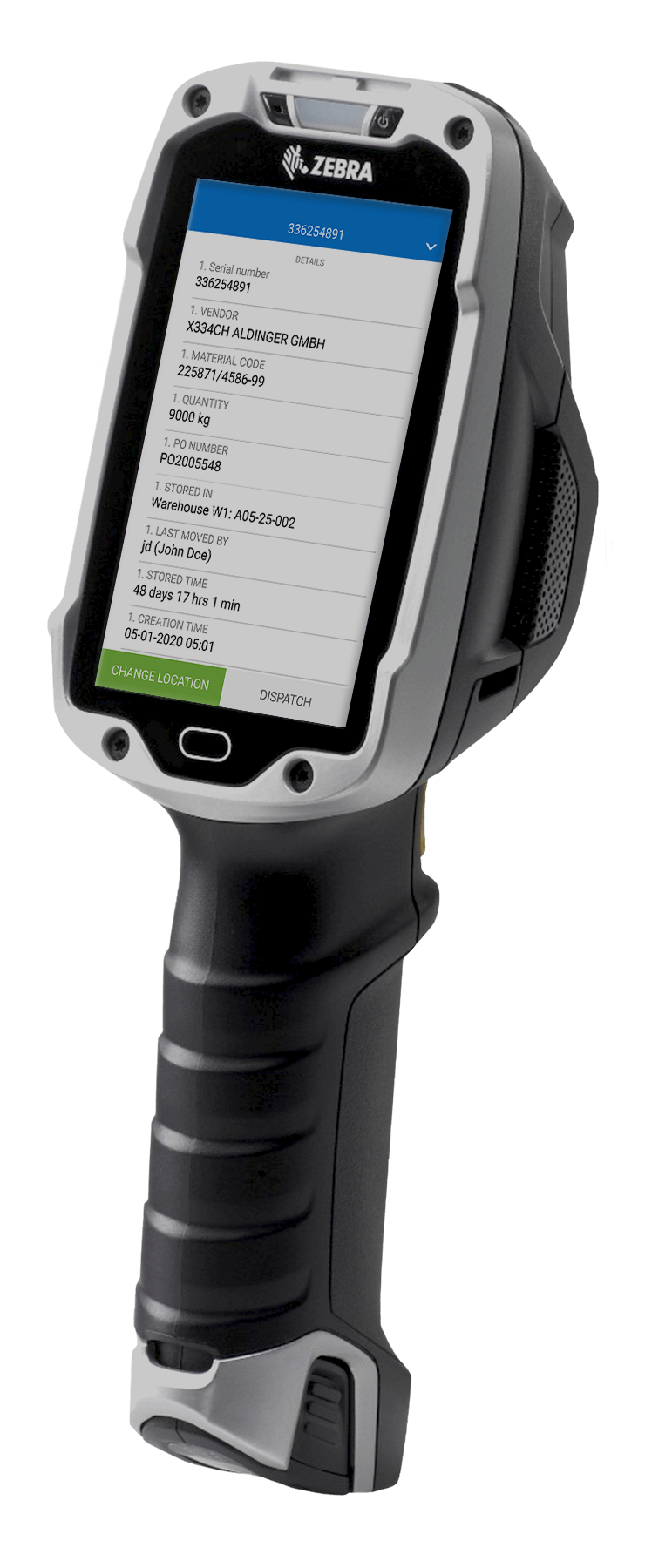
The whole module runs on handheld and vehicle-mounted devices. Scan a location, a container or a serialised product and act on it: receive, put away, move, pick, issue, count, hold. Data is live, so what the driver just did is what the supervisor’s screen shows.
Dispatch with a quality gate
Shipping orders are issued to the user, and every scanned container or serial is verified against the order before it can be loaded. Blocked goods cannot be shipped; a block is lifted only by an authorised user, and held material can be moved to a quarantine location for a QC decision.
Stocktaking and cycle counting
Count by location, zone or item class while the plant runs. Counted quantities are compared against system stock, differences are listed for approval, and approved corrections are posted to the ERP with the user, device and timestamp attached – so an adjustment is auditable rather than anonymous.
Material traceability software for manufacturing: lots, serials and genealogy
Traceability is not a report you generate. It is a by-product of recording movements properly in the first place, and it either exists in your data or it does not. That is the test any lot tracking software has to pass: not whether it can print a trace, but whether the movements behind the trace were captured at the moment they happened.
spWMS uses automatic identification to record events as they happen. Scanning a 1D barcode, a 2D code or an RFID tag captures status, location and product detail in one action, and the identifier carries the rest with it: serial number, lot, current location, the path taken so far, and the list of operations already performed. Because the same identifier is read in the store and on the line, the material record and the production record are the same record.
Lot and batch tracking
Every receipt creates a lot with its supplier, delivery, certificate and shelf life. Every issue records which lot went to which order and which workstation. FIFO and FEFO are enforced at picking rather than encouraged in a procedure.
Serial number tracking
Serialised units are tracked individually from receipt to dispatch. Where a serialised component goes into a serialised assembly, the parent-child link is recorded, giving genealogy in both directions.
Backward and forward trace
Backward: for a finished pallet, the full material list with lots, suppliers, operators, machines and timestamps. Forward: for a suspect supplier lot, every order, pallet and shipment it reached. Both are queries, not investigations – which is the difference between a contained recall and a broad one.
Multi-warehouse and multi-site
The same data model spans several warehouses and several plants, so a product’s full history is available in one place instead of being assembled from local spreadsheets.
Audit evidence
Every movement carries user, device, location and timestamp. Combined with QMS und bei der regulierten Produktion, electronic batch records, the material history becomes part of the record an auditor asks for rather than something reconstructed for the visit.
Feeding the line: material call-off, kanban and WIP
This is the part a distribution WMS structurally cannot do, and the reason a plant with a good ERP and a good distribution system can still starve its own lines.
Call-off from the production order
The line raises a material request against the order it is running. spWMS turns it into a picking task with suggested locations, respecting lot rules and permitted flow. The warehouse sees what production needs and when; production sees whether it is coming.
Line-side buffers and replenishment
Line-side stock is modelled as locations like any other, with min/max levels. When a buffer falls below its trigger, replenishment is raised automatically. Kanban loops are handled the same way, with the scan of an empty container acting as the signal.
Kitting
Assemble a kit for an order or a workstation, scan the components into a container, and the kit is tracked as a unit with its contents recorded. Missing components are flagged before the kit reaches the line rather than at the point of use.
WIP between operations
Semi-finished material moving between operations is tracked as located, identified stock – not as an unrecorded pile between two machines. WIP tracking closes the largest blind spot in most plants’ inventory, and it is what makes end-of-month variance explainable.
Consumption and returns
Consumption is posted as material is issued to the order, not backflushed hours later. Unused material is returned to store by scan, with its lot intact, so the next order can use it legitimately.
Picking, packing and dispatch - with a gate that only good parts pass
Shipping orders are written out to the user automatically. As containers and serialised products are scanned, the system checks each one against the order: correct item, correct revision, correct lot, quality status released. Anything that fails is refused at the scan.
That check is the point. Warehouse picking software that only confirms quantities will happily ship a quarantined lot in the right quantity. spWMS ships only material that is both correct and released, and it prompts the picker for the location to take it from, so the fastest route is also the compliant one.
Order progress is monitored and visualised. A shipment can be blocked mid-pick and resumed only by an authorised user. Blocked goods can be moved to another location for a QC decision, and the decision is recorded against the material rather than in an inbox.
Barcodes, RFID and the hardware it runs on
Automatic identification is the mechanism the rest of the module depends on. Get it right physically and the data is free; get it wrong and you are back to typing.
1D and 2D codes
Standard linear barcodes and 2D codes – Data Matrix, QR – read on handhelds and fixed scanners. Supplier labels are parsed where they follow GS1 conventions, so a compliant inbound label needs no relabelling.
RFID
RFID tags for containers, returnable packaging and assets that pass through a gate rather than a scanner. Useful where line-of-sight scanning is impractical or where a whole pallet must be read at once.
Mobile terminals
Rugged handhelds and truck-mounted terminals, working live against the system. Screens are built for one-handed use in a cold store with gloves on, because that is where they are used.
Label printing
Automatic printing at receipt, repack and dispatch from label templates managed in the system, assigned per item or per customer.
Automation interfaces
Where the site has conveyors, ASRS, AGVs or AMRs, spWMS exchanges location and task data with them over the same integration layer it uses for the ERP. See machine connectivity and integration.
How spWMS fits with your ERP, MES and automation
A warehouse module that cannot post back to the ERP creates a second set of books. WMS integration is not a feature here; it is the condition of the thing being useful.
ERP
Master data, purchase orders, production orders and deliveries come down; goods receipts, movements, consumption, adjustments and goods issues go back up. SAP, Oracle, Infor and Microsoft environments are in scope, along with older systems reached through file or database interfaces. The ERP stays the system of record for value; spWMS is the system of record for physical location and identity.
MES and MOM
Automation and PLC
Signals from equipment, scanners and gates via direct PLC drivers and OPC UA, so an automated put-away or an ASRS confirmation does not need a person to acknowledge it.
Quality and lab
Deployment
On-premise, private cloud or hosted; see Cloud-Fertigung. Accevo owns its source code, so interfaces and screens are modified for your process rather than worked around.
Who uses it, and for what
Warehouse / Logistics Manager
Live stock by location, container and lot, without a counting round. Replenishment triggered by consumption rather than by somebody noticing. Cycle counts run while the plant works, and adjustments that carry a name, a device and a timestamp.
Produktionsleiter
Material cover per line before the shift starts, call-off progress during it, and no more stoppages caused by stock that exists somewhere in the building. Consumption posted against the order as it happens, so the shift’s material variance is known at the end of the shift.
Qualitätsmanager
Holds that actually hold: quarantined lots cannot be picked or shipped, and the block is lifted only by an authorised user. Backward and forward trace on demand, so containment is scoped to the lots involved instead of to the whole week’s production.
IT / OT
One integration to the ERP rather than a scanner middleware estate. Standard interfaces, a documented data model, and a module that shares a platform and a security model with the rest of the Accevo suite.
Where a shop floor warehouse module earns its keep
Wherever material identity matters as much as material quantity.
- Automotive – component lots, serial traceability and customer-specific labelling, with the genealogy an IATF 16949 audit expects
- Luft- und Raumfahrt – build kits, configuration and effectivity control, serialised parts and full build genealogy
- Pharmaindustrie – batch integrity, shelf life, line clearance and quarantine that cannot be bypassed
- FMCG – high SKU counts, FEFO on short-life material, and packaging stock that has to keep up with changeovers
- Schrumpffolie – reels, substrates and format-dependent material sets fed to fast lines
- Discrete manufacturing – WIP between operations, kitting and returns
- Tabak – regulated material accounting across multi-site operations
What implementation looks like, how long it takes and what it costs
Two questions get asked in the first meeting. Both deserve a real answer on the page rather than a form.
How long: about three months
About three months end to end for a typical plant. The variables are how many warehouses and flows are in scope, how much of the physical structure already exists in a usable form, and how many integrations are needed. A single-warehouse deployment with no customisation and one ERP interface is faster; a multi-site rollout with automation interfaces takes longer.
What the cost depends on
The functionality in scope, the size of the operation – warehouses, users, devices – and the integration work. Before quoting, our team assesses the current state of the facility: locations, labelling, network coverage in the racking, device fleet, master data quality. Bringing a site up to a standard where the system can work is real work, and it belongs in the estimate rather than in a surprise.
Three phases
1. Assessment – map warehouses, flows, containers and identification; decide what is modelled, what is labelled and what changes physically. 2. Configuration and integration – build the structure and flow rules, configure labels and devices, connect the ERP and MES. 3. Rollout – go live by warehouse or by flow, with the previous method running alongside until the counts agree, then withdraw it.
Start small deliberately
One warehouse or one flow – inbound and put-away, or line supply for a single value stream – is enough to prove the data and the discipline. It is also enough to expose whichever physical problem, usually labelling or wireless coverage, would have derailed a site-wide start.

Kontakt mit unserem Experten
Michał Chmiel, Experte für industrielle Software
- Ein 60-minütiges Online-Meeting mit einem engagierten Spezialisten, der ein Top-System aus einer ähnlichen Branche wie der Ihren vorstellt
- Live-Modellierung Ihres Produktionsprozesses
- Ein Budgetangebot nach der Sitzung