Shop Floor Warehouse Management & Manufacturing Inventory Software
A production warehouse module, not a distribution WMS. Accevo spWMS tracks every pallet, container, lot and serial number inside the plant - from goods receipt to the line side to dispatch - and hands each movement back to your ERP as it is scanned.
Barcode, 2D and RFID scanning on mobile terminals, built as a module of the Accevo manufacturing platform - so a material movement and the production order that caused it live in one record instead of two systems that disagree by Friday.
What is shop floor warehouse management - and how it differs from a WMS
A shop floor warehouse – a production warehouse, or simply the plant store – holds the material a line is about to consume and the goods it has just produced: raw material, components, packaging, work in progress, semi-finished and finished pallets waiting to move. It is measured in hours of line cover, not in days of order backlog, and it is the stock that stops production when it is wrong.
Shop floor warehouse management software controls that stock at location, container, lot and serial level, and records every movement at the moment somebody scans it. That is the whole idea: the record is created by the physical act, not typed up afterwards.
A distribution WMS solves a different problem. It exists to get customer orders out of a building – wave and batch picking, carrier selection, parcel manifests, dock and yard scheduling, slotting optimised for pick-path length. If that is what you need, buy one; the specialist vendors are good at it and Accevo does not compete with them.
spWMS is for the other half of the site: the stock production touches. Its job is to get the right material, in the right revision and the right lot, to the right workstation, and to record everything consumed and produced against the order that consumed it. It is manufacturing inventory management software, and it reports to the production schedule rather than to the shipping dock. Put another way: a warehouse management system for manufacturing manages intralogistics – the material handling that happens between your goods-in dock and your machines – rather than the fulfilment that happens between your racks and your customers.

Where the module sits: ERP stock, distribution WMS, shop floor WMS
Most plants already own two of these three and assume the third is covered. It usually is not, which is why the forklift driver still has a clipboard. spWMS does not replace your ERP and does not pretend to be a distribution system – it fills the gap between a stock balance and a pallet. See integration and scalability for how the three exchange data.
ERP inventory (SAP, Oracle, Infor, Dynamics)
Holds the commercial truth: valuation, MRP, purchasing, costing, plant and storage-location balances. Authoritative on how much you own and what it is worth. Normally silent on where in a 40,000 m2 building it is, which container it is in, and which lot moved at 14:20 – and stock is posted in transactions, often batched at end of shift.
Distribution WMS
Optimises outbound fulfilment from a warehouse or DC: order waves, pick paths, packing, carrier and parcel handling, dock and yard. Excellent at getting boxes to customers. It has no concept of a production order, a routing operation, a machine or a bill of materials, so it cannot supply a line or record consumption against an order.
Accevo spWMS
Governs physical material inside the plant at scan resolution and ties it to production. Rack, position, container, lot, serial. Goods receipt against the PO, put-away, buffers, internal supply to the line, WIP, quality holds, dispatch. Every movement is timestamped to a person and a device, and posted back to the ERP.
ERP stock records vs a scanned shop floor
Ask a plant why a line stopped and you will sometimes be told the material was in the system. It was. Being in the system and being findable in eleven minutes are different properties, and only one of them keeps the line running.
Once material is scanned at every touch, the reconciliation disappears. There is no shift-end catch-up, no counting team correcting a booking team, and no argument about whether the pallet exists – because the record and the movement are the same event.
With ERP stock alone:
- Stock booked to a storage location, so nobody can name the rack, the pallet or the container
- Line waits while a driver searches for material the system says is in the building
- Consumption backflushed at end of shift, so variances surface days later against the wrong order
- Lots and serials traced on paper travellers, so a recall means somebody reading files
- Stocktaking needs the plant stopped, and the result is stale the next morning
- Two teams, one counting and one booking, producing two numbers
With scanned shop floor warehouse management:
- Every pallet, container and serial located to a rack position, visible live
- Material called off by the line and picked from a system-suggested location
- Movements recorded as they happen, by the operator who made them, on a mobile terminal
- Full genealogy: which lot entered which order, on which machine, at what time
- Cycle counting by location while the plant runs
- One record, created by the scan, shared with the ERP
What the spWMS module actually does
Ten functions. Between them they cover every point at which material is received, moved, consumed, held or shipped inside the plant – which is the same as saying they cover every point at which an ERP stock figure normally starts drifting from reality.
Warehouse structure modelling
Define your own structure and its levels: warehouses, zones, racks, locations, positions. Custom properties per warehouse type and per level let the model follow how the plant actually works rather than a vendor’s idea of a shelf. Permitted material flow between warehouses is configured, so the system blocks a move your process does not allow instead of recording it and letting quality find out later.
Goods receipt against the purchase order
Incoming material is registered on receipt, a label is printed automatically for each batch or handling unit, and the goods are put away to a location in the same transaction. Progress and completeness are tracked against the PO, and a shortage or over-delivery is registered at the dock – where it can still be resolved – rather than at the line three days later.
Buffers and live stock
One view of where everything is: current inventory per warehouse, occupancy per level, the contents of each container, the serial number of each unit. Line-side buffers are visible with the rest, so a supervisor can see two hours of cover running out before the line does.
Warehouse movements
Move a scanned container or a serialised product to a new location. Partial moves are supported – take part of the quantity and leave the rest – and several moves can be completed in one transaction. The system permits only destinations consistent with the configured flow, which is what stops raw material being put away in a finished-goods aisle.
Material supply to production
An automatic handshake between MES on the line and spWMS in the store. Requests are raised from the production order, managed as a picking list in the warehouse, and collected from suggested locations, with progress monitored throughout.
Containers and repacking
Manage containers with their location and status: view contents, change status, move products between containers, remove items, repack. Container-level handling is what lets a plant move fifty parts with one scan and still know the serial number of each one.
Label design and printing
Design and manage labels in the system, assigned per item or per customer, and print them automatically at defined points – goods receipt, repack, dispatch. No separate labelling tool to keep in step with the item master.
Mobile terminals
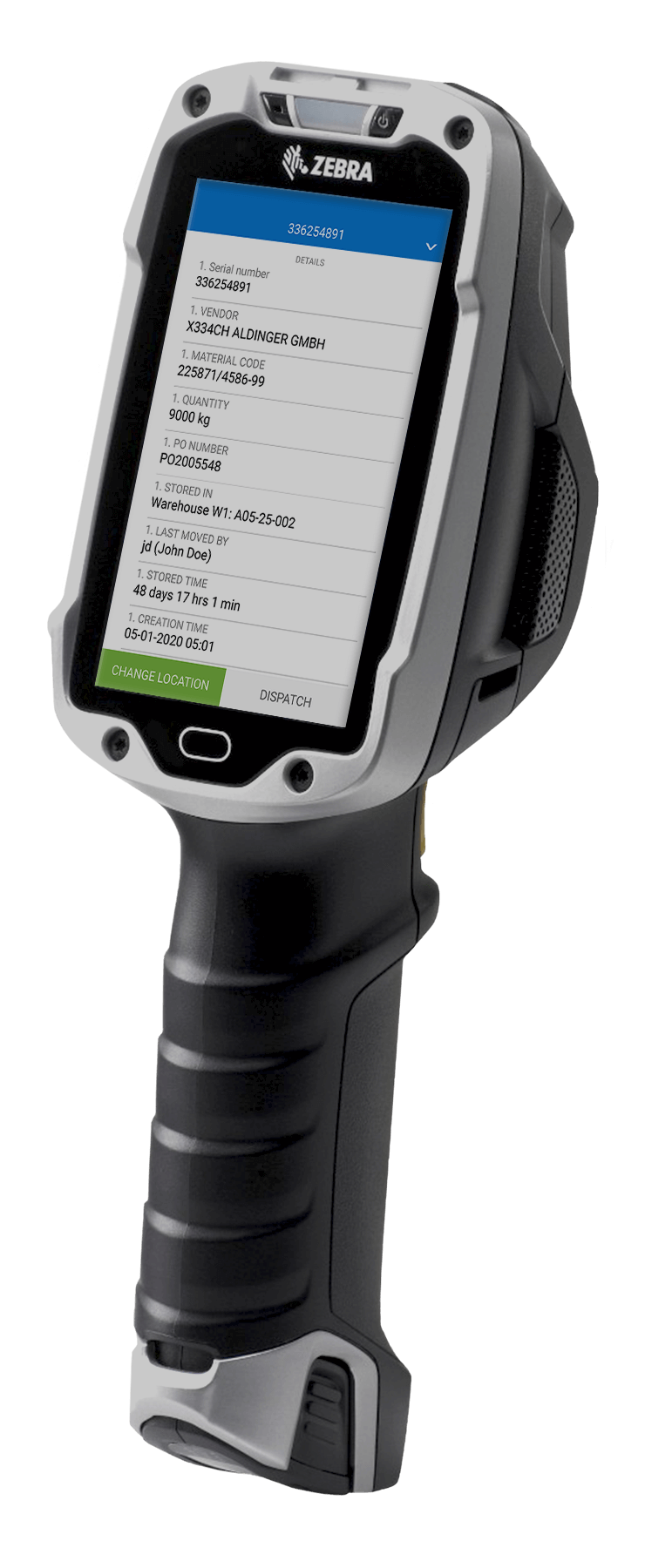
The whole module runs on handheld and vehicle-mounted devices. Scan a location, a container or a serialised product and act on it: receive, put away, move, pick, issue, count, hold. Data is live, so what the driver just did is what the supervisor’s screen shows.
Dispatch with a quality gate
Shipping orders are issued to the user, and every scanned container or serial is verified against the order before it can be loaded. Blocked goods cannot be shipped; a block is lifted only by an authorised user, and held material can be moved to a quarantine location for a QC decision.
Stocktaking and cycle counting
Count by location, zone or item class while the plant runs. Counted quantities are compared against system stock, differences are listed for approval, and approved corrections are posted to the ERP with the user, device and timestamp attached – so an adjustment is auditable rather than anonymous.
Material traceability software for manufacturing: lots, serials and genealogy
Traceability is not a report you generate. It is a by-product of recording movements properly in the first place, and it either exists in your data or it does not. That is the test any lot tracking software has to pass: not whether it can print a trace, but whether the movements behind the trace were captured at the moment they happened.
spWMS uses automatic identification to record events as they happen. Scanning a 1D barcode, a 2D code or an RFID tag captures status, location and product detail in one action, and the identifier carries the rest with it: serial number, lot, current location, the path taken so far, and the list of operations already performed. Because the same identifier is read in the store and on the line, the material record and the production record are the same record.
Lot and batch tracking
Every receipt creates a lot with its supplier, delivery, certificate and shelf life. Every issue records which lot went to which order and which workstation. FIFO and FEFO are enforced at picking rather than encouraged in a procedure.
Serial number tracking
Serialised units are tracked individually from receipt to dispatch. Where a serialised component goes into a serialised assembly, the parent-child link is recorded, giving genealogy in both directions.
Backward and forward trace
Backward: for a finished pallet, the full material list with lots, suppliers, operators, machines and timestamps. Forward: for a suspect supplier lot, every order, pallet and shipment it reached. Both are queries, not investigations – which is the difference between a contained recall and a broad one.
Multi-warehouse and multi-site
The same data model spans several warehouses and several plants, so a product’s full history is available in one place instead of being assembled from local spreadsheets.
Audit evidence
Every movement carries user, device, location and timestamp. Combined with QMS and, in regulated production, electronic batch records, the material history becomes part of the record an auditor asks for rather than something reconstructed for the visit.
Feeding the line: material call-off, kanban and WIP
This is the part a distribution WMS structurally cannot do, and the reason a plant with a good ERP and a good distribution system can still starve its own lines.
Call-off from the production order
The line raises a material request against the order it is running. spWMS turns it into a picking task with suggested locations, respecting lot rules and permitted flow. The warehouse sees what production needs and when; production sees whether it is coming.
Line-side buffers and replenishment
Line-side stock is modelled as locations like any other, with min/max levels. When a buffer falls below its trigger, replenishment is raised automatically. Kanban loops are handled the same way, with the scan of an empty container acting as the signal.
Kitting
Assemble a kit for an order or a workstation, scan the components into a container, and the kit is tracked as a unit with its contents recorded. Missing components are flagged before the kit reaches the line rather than at the point of use.
WIP between operations
Semi-finished material moving between operations is tracked as located, identified stock – not as an unrecorded pile between two machines. WIP tracking closes the largest blind spot in most plants’ inventory, and it is what makes end-of-month variance explainable.
Consumption and returns
Consumption is posted as material is issued to the order, not backflushed hours later. Unused material is returned to store by scan, with its lot intact, so the next order can use it legitimately.
Picking, packing and dispatch - with a gate that only good parts pass
Shipping orders are written out to the user automatically. As containers and serialised products are scanned, the system checks each one against the order: correct item, correct revision, correct lot, quality status released. Anything that fails is refused at the scan.
That check is the point. Warehouse picking software that only confirms quantities will happily ship a quarantined lot in the right quantity. spWMS ships only material that is both correct and released, and it prompts the picker for the location to take it from, so the fastest route is also the compliant one.
Order progress is monitored and visualised. A shipment can be blocked mid-pick and resumed only by an authorised user. Blocked goods can be moved to another location for a QC decision, and the decision is recorded against the material rather than in an inbox.
Barcodes, RFID and the hardware it runs on
Automatic identification is the mechanism the rest of the module depends on. Get it right physically and the data is free; get it wrong and you are back to typing.
1D and 2D codes
Standard linear barcodes and 2D codes – Data Matrix, QR – read on handhelds and fixed scanners. Supplier labels are parsed where they follow GS1 conventions, so a compliant inbound label needs no relabelling.
RFID
RFID tags for containers, returnable packaging and assets that pass through a gate rather than a scanner. Useful where line-of-sight scanning is impractical or where a whole pallet must be read at once.
Mobile terminals
Rugged handhelds and truck-mounted terminals, working live against the system. Screens are built for one-handed use in a cold store with gloves on, because that is where they are used.
Label printing
Automatic printing at receipt, repack and dispatch from label templates managed in the system, assigned per item or per customer.
Automation interfaces
Where the site has conveyors, ASRS, AGVs or AMRs, spWMS exchanges location and task data with them over the same integration layer it uses for the ERP. See machine connectivity and integration.
How spWMS fits with your ERP, MES and automation
A warehouse module that cannot post back to the ERP creates a second set of books. WMS integration is not a feature here; it is the condition of the thing being useful.
企业资源规划
Master data, purchase orders, production orders and deliveries come down; goods receipts, movements, consumption, adjustments and goods issues go back up. SAP, Oracle, Infor and Microsoft environments are in scope, along with older systems reached through file or database interfaces. The ERP stays the system of record for value; spWMS is the system of record for physical location and identity.
MES and MOM
Automation and PLC
Signals from equipment, scanners and gates via direct PLC drivers and OPC UA, so an automated put-away or an ASRS confirmation does not need a person to acknowledge it.
Quality and lab
Deployment
On-premise, private cloud or hosted; see cloud manufacturing. Accevo owns its source code, so interfaces and screens are modified for your process rather than worked around.
Who uses it, and for what
Warehouse / Logistics Manager
Live stock by location, container and lot, without a counting round. Replenishment triggered by consumption rather than by somebody noticing. Cycle counts run while the plant works, and adjustments that carry a name, a device and a timestamp.
生产经理
Material cover per line before the shift starts, call-off progress during it, and no more stoppages caused by stock that exists somewhere in the building. Consumption posted against the order as it happens, so the shift’s material variance is known at the end of the shift.
质量经理
Holds that actually hold: quarantined lots cannot be picked or shipped, and the block is lifted only by an authorised user. Backward and forward trace on demand, so containment is scoped to the lots involved instead of to the whole week’s production.
IT / OT
One integration to the ERP rather than a scanner middleware estate. Standard interfaces, a documented data model, and a module that shares a platform and a security model with the rest of the Accevo suite.
Where a shop floor warehouse module earns its keep
Wherever material identity matters as much as material quantity.
- 汽车 – component lots, serial traceability and customer-specific labelling, with the genealogy an IATF 16949 audit expects
- 航空航天 – build kits, configuration and effectivity control, serialised parts and full build genealogy
- 制药行业 – batch integrity, shelf life, line clearance and quarantine that cannot be bypassed
- 快消行业 – high SKU counts, FEFO on short-life material, and packaging stock that has to keep up with changeovers
- 包装 – reels, substrates and format-dependent material sets fed to fast lines
- Discrete manufacturing – WIP between operations, kitting and returns
- 烟草 – regulated material accounting across multi-site operations
What implementation looks like, how long it takes and what it costs
Two questions get asked in the first meeting. Both deserve a real answer on the page rather than a form.
How long: about three months
About three months end to end for a typical plant. The variables are how many warehouses and flows are in scope, how much of the physical structure already exists in a usable form, and how many integrations are needed. A single-warehouse deployment with no customisation and one ERP interface is faster; a multi-site rollout with automation interfaces takes longer.
What the cost depends on
The functionality in scope, the size of the operation – warehouses, users, devices – and the integration work. Before quoting, our team assesses the current state of the facility: locations, labelling, network coverage in the racking, device fleet, master data quality. Bringing a site up to a standard where the system can work is real work, and it belongs in the estimate rather than in a surprise.
Three phases
1. Assessment – map warehouses, flows, containers and identification; decide what is modelled, what is labelled and what changes physically. 2. Configuration and integration – build the structure and flow rules, configure labels and devices, connect the ERP and MES. 3. Rollout – go live by warehouse or by flow, with the previous method running alongside until the counts agree, then withdraw it.
Start small deliberately
One warehouse or one flow – inbound and put-away, or line supply for a single value stream – is enough to prove the data and the discipline. It is also enough to expose whichever physical problem, usually labelling or wireless coverage, would have derailed a site-wide start.

常见问题解答
Shop floor warehouse management, explained
No, and that matters. spWMS is a shop floor warehouse module: it manages the material inside a manufacturing plant - raw material, components, packaging, WIP and finished goods awaiting dispatch - at location, container, lot and serial level. It does not do distribution-centre work such as carrier selection, parcel manifesting, wave planning for parcel fulfilment or yard management. If you run a distribution centre, you need a distribution WMS. If your warehouse exists to feed production lines, this is the module built for that.
A distribution WMS is organised around outbound customer orders and optimises pick paths, packing and shipping. A shop floor warehouse system is organised around production orders: it supplies workstations, tracks WIP between operations, records consumption against the order, and enforces lot and quality rules on material entering the line. The two overlap on the physical basics - locations, scanning, put-away - and diverge completely on what they are optimising for.
Yes. The ERP remains the system of record for stock value, MRP, purchasing and costing. spWMS is the system of record for where material physically is and which lot or serial it carries, and it posts receipts, movements, consumption, adjustments and issues back to the ERP. The point is to make the ERP's numbers true, not to duplicate them.
Three things: the functionality in scope, the scale of the operation - number of warehouses, users and mobile devices - and the integration work required. Before quoting, our team assesses the current state of the facility, because locations, labelling, wireless coverage and master data often need work before any system can function, and that work belongs in the estimate.
Around three months for a typical plant, start to finish. A single warehouse with no customisation and one ERP interface goes faster; a multi-site rollout with automation interfaces takes longer. The assessment phase is the part worth not compressing.
Yes. Master and transactional data are exchanged with SAP and with Oracle, Infor and Microsoft environments, as well as with older systems reached through file or database interfaces. See integration and scalability.
Yes, both, and the relationship between them. Lots carry supplier, delivery and shelf life; serialised units are tracked individually; and where a serialised component enters a serialised assembly, the parent-child link is recorded. That gives backward trace from a finished unit and forward trace from a suspect supplier lot.
Yes. 1D barcodes, 2D codes such as Data Matrix and QR, and RFID tags, on handheld and vehicle-mounted terminals as well as fixed readers and gates. Choice per flow, not per site.
Yes, and we recommend it. One warehouse or one flow proves the data and surfaces the physical issues - labelling, coverage, structure - while they are still cheap to fix.
Every movement carries user, device, location, lot and timestamp, so a trace is a query rather than an investigation. Backward from a pallet you get the full material list; forward from a supplier lot you get every order and shipment it reached. Combined with QMS and, in regulated production, EBR, the material history is part of the record rather than something reconstructed for the auditor.
近期文章

如何通过使用现代车间WMS和自主移动机器人来管理生产? (视频)
现代工厂必须不断发展和提高效率指标,以实现和保持强大的市场地位。做到这一点的方法之一是使用现代技术解决方案,如WMS或AMR。它们如何帮助管理生产,以及为什么有必要整合这些解决方案?
WMS - 如何选择一个仓库管理系统,它的成本是多少?
仓库管理系统用于更好地控制仓库流程和提高效率指标。为了达到提高流程效率和质量的预期效果,有必要为工厂配备合适的软件。选择哪种 WMS 系统以及它的成本是多少?