

MES integration for a packaging line connects production orders with line execution, then returns actual output, events and traceability data to the systems that need them. A workable design defines who owns each data item, how equipment communicates and what operators should see when an interface fails.
What packaging line MES integration connects
An MES integration links the production order and product definition to the activities on the line. The MES may send a released job, work instructions or approved parameters. Machine controls report status, counts and defined events. Quality checks and line-clearance steps can record whether the work may proceed. At completion, the MES can return actual quantities and production status to ERP or other systems, if the interface scope includes them.
That does not mean MES should directly control every machine movement. PLCs and machine controllers keep responsibility for local control and equipment safety. An MES may issue a job or an authorized set of production parameters, while the control layer validates what the equipment can accept.
A typical data flow
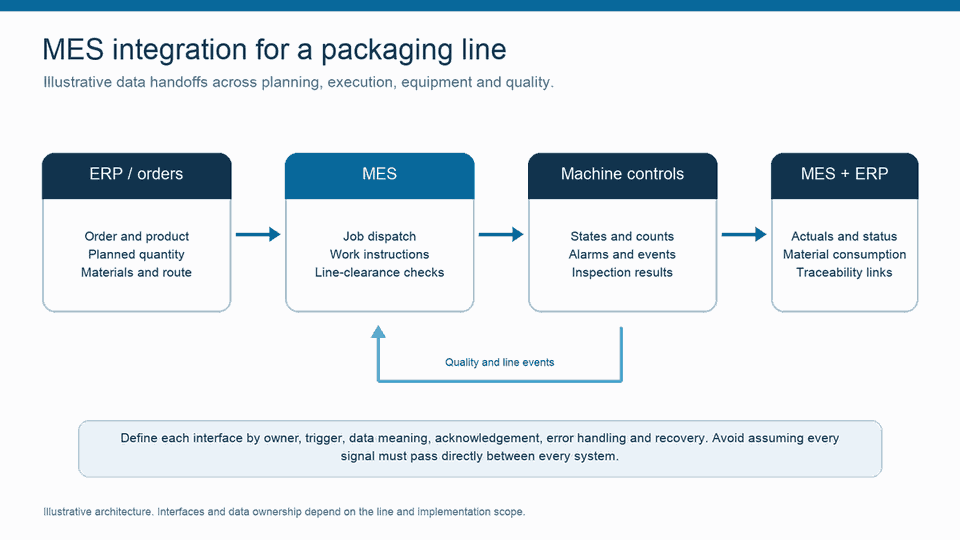
A project can start with four handoffs:
- Von ERP zu MES: order identifier, product, planned quantity, route, material and schedule data included in the interface scope.
- MES to line: released job, work instructions, material checks or approved parameters, where the equipment and process support the exchange.
- Line to MES: machine state, produced count, rejects, downtime events, inspection results or alarms selected for the use case.
- MES to ERP or quality systems: completion status, actual quantities, material consumption, holds or other agreed results.
Agree on the meaning of every status. “Complete,” for example, could mean the machine finished a run, the MES closed the operation, or the order reached a reporting milestone. Give each state a clear owner and transition rule.
Use standards where they fit
ISA-95 provides models for information exchange between enterprise functions and manufacturing operations. It can help teams define the boundary between business orders and shop-floor execution before they design individual interfaces.
For packaging equipment, PackML defines common machine states and operating flow. The OPC UA PackML model can give machines a more consistent interface for status, alarms and commands. Treat it as an option to assess during equipment review, not a requirement for every packaging line. Legacy controls may need a gateway, an OEM interface or a separately engineered connection.
Six design checks before connecting the line
- Assign a source of truth. Identify which system owns the order, product version, material lot, line state, output count and quality disposition.
- Inventory equipment. Record controller type, available protocols, existing gateways, signal quality and any OEM or site constraints.
- Agree on the data model. Define machine names, units, time zones, batch and order identifiers, count semantics and state transitions.
- Specify the failure path. Decide how the interface reports stale data, rejected commands, duplicate messages, network loss and recovery. Operators need a clear status and safe next step.
- Keep command permissions explicit. Document which system can send each command or parameter, how the controller validates it and how users authorize a change.
- Test the full workflow. Include normal production, changeover, line hold, reject event, restart and communications outage. Trace the same order through MES, machine and ERP records.
Plan the rollout around a line-level use case
Choose one line where the team can measure a specific gap, such as duplicate order entry, missing stop reasons or delayed completion reporting. Baseline the current data and confirm the people who will own each interface. Test the process with realistic exceptions before you expand to additional machines or sites.
Accevos MES integration and scalability page describes its integration approach. For a packaging context, see digital solutions for packaging operations und die packaging-line OEE case study. Use case-study details as examples of one project, not as a promise of the same result on another line.

Common MES packaging integration questions
Can one MES connect machines from different vendors?
It can when the project provides workable interfaces and consistent data definitions. The effort depends on the controllers, available protocols, equipment access, data quality and required behavior. Confirm each machine during discovery rather than assuming one connector covers the whole line.
Does MES replace the packaging machine PLC?
No. The PLC or machine controller manages local sequence and safety functions. MES coordinates production workflow and exchanges defined job, status and result data with the control layer.
Which data should a packaging line send to MES?
Choose data that serves a defined workflow or decision. Common candidates include run state, good and rejected counts, selected alarms, order identifiers and inspection outcomes. Define collection frequency and source at the equipment level.
Successful integration starts with a small, explicit contract between each system: owner, trigger, fields, response and recovery. Once teams agree on that contract, they can test the line as one production process instead of a set of disconnected interfaces.
Data integration moves defined production information between systems; analytics uses contextualised data to find patterns and guide decisions. The two are complementary: useful analysis depends on reliable data flows. For the analytics side, see our manufacturing data analytics guide.
