

SCADA helps operators monitor and control equipment. MES helps production teams manage orders, materials and quality, and record how each batch or unit was made. Plants use both when they need a live view of the process and a production history they can trace.
For example, SCADA can show that a filling line stopped because pressure fell. MES can connect that stop to the order and material lot, so the quality team knows which output to inspect.
The choice starts with the gap you need to close: equipment visibility, production execution, or both.
MES vs SCADA at a glance
| What you need to know | SCADA | MES |
|---|---|---|
| Main purpose | Monitor equipment and supervise the process | Manage production work and its records |
| Typical data | Machine states, alarms, temperatures and pressures | Orders, quantities, material lots and quality results |
| Operator tasks | Check trends, acknowledge alarms and use permitted controls | Follow instructions, scan materials and record checks |
| When a line stops | Show the fault and equipment state | Link the stop to an order and record the production loss |
| Trazabilidad | Preserve equipment and process history | Connect materials and operations to a batch or finished unit |
Functions can overlap. Some SCADA products include batch workflows, and some MES products show live machine data. Check which system will own each task and record in your plant.
What does SCADA do?
SCADA stands for supervisory control and data acquisition. Operators use it to see what equipment is doing and respond to process changes. A typical screen shows machine status, alarms and trends such as pressure or temperature. Depending on the plant’s controls, authorized operators may also adjust setpoints or issue supervisory commands.
On a filling line, an operator might use SCADA to investigate a low-pressure alarm and check whether pressure recovered before restarting. The PLC, or programmable logic controller, handles the underlying machine control logic.
NIST’s SCADA definition provides further background on data acquisition and supervisory control.
What does MES do?
A manufacturing execution system (MES) helps teams carry out and record production work. Operators can receive an order, follow work instructions, check materials and enter quality results. Supervisors can track progress, losses and work in progress.
MES adds the context that a machine signal alone cannot provide: which order was running, which lot the operator used, and what happened to the output. Teams use that history for material traceability, quality investigations and production reporting.
To build a dependable record, you need accurate order data, material identification and machine events. Define who maintains those inputs during implementation.
A factory example: one stop, three views
Imagine that a filler stops for 40 seconds during a batch. An operator also scans a material container that the current order does not allow.

The equipment view: SCADA shows the fault, pressure trend and machine state. The operator investigates and restarts the line under the plant’s control procedure.
The production view: With the relevant checks configured, MES flags or blocks the material mismatch. It records the exception against the order and connects the stop to the active batch. The quality team can then identify affected output and decide whether to hold it for inspection.
The business view: ERP receives the agreed production results, such as completed quantities and material consumption. Planners use those results for inventory and order planning. Our MES vs ERP guide explains this relationship.
Each team needs a different view of the same event. Integration keeps those views connected.
How MES and SCADA work together
MES can receive equipment events from SCADA, a historian or an integration layer. It can also receive machine data through an edge gateway or a connection such as OPC UA. Choose the route that fits your existing controls and the data you need.
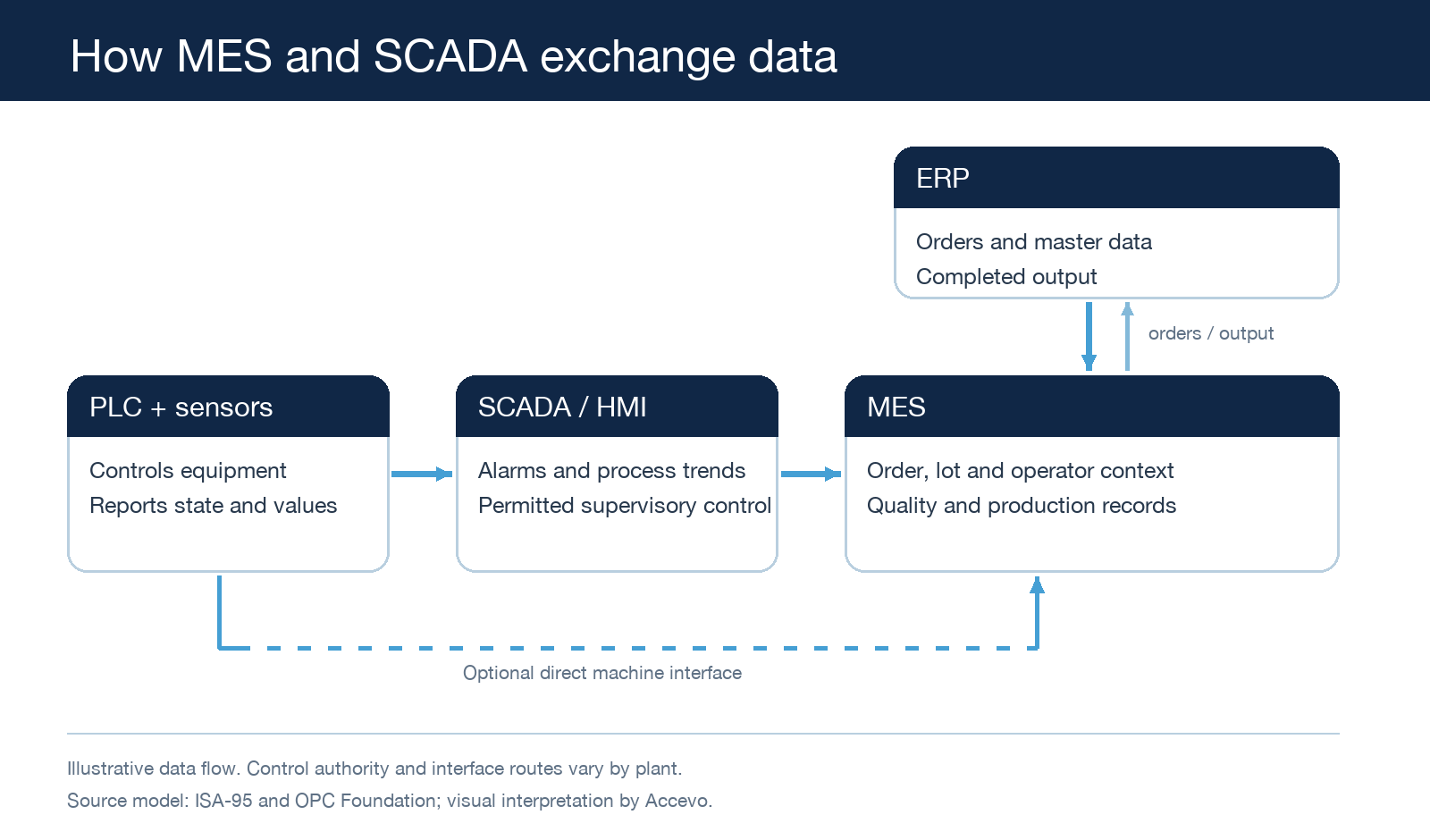
For a useful production record, agree on five points before building the interface:
- Machine states: Define running, stopped, blocked and starved, and agree how your team will classify losses.
- Order and lot IDs: Decide how you will attach each event to the correct operation, order and material lot.
- Timestamps: Synchronize clocks and test events that arrive after an order change.
- Recovery: Test how the interface handles a lost connection, buffered data and duplicate events.
- Access and ownership: Name who can change a setpoint, release a quality hold and correct a production record.
El ISA-95 framework helps teams describe responsibilities and information exchange across business, manufacturing and control activities. The OPC Foundation’s Weihenstephan interface model gives a more specific example of machine and higher-level system communication. Use these references to support your design discussion with the controls and IT teams.
Do you need SCADA, MES, or both?
Prioritize SCADA when operators lack a clear view of equipment. Your main needs may be alarms, process trends and access to supervisory controls.
Prioritize MES when your gap concerns production work and records. Examples include paper instructions, manual loss reporting, incomplete material traceability or quality checks that staff cannot connect to an order. Keep the machine controls and operator interfaces your process requires.
Integrate both when you need equipment supervision and order-level execution. This often applies to plants that must respond to faults during a shift and later explain what happened to a batch or unit.
Start by listing the tasks your current systems already handle. Then identify the missing workflow or record and evaluate how to provide it.
What to check in a supplier demo
Bring one production order, one material lot, a short stop and a failed quality check. Ask the supplier to show the operator screens and the resulting records.
- Can you connect the machine stop to the correct order without matching records by hand?
- Can an operator use a wrong or held material? Show the rule and any authorized override.
- Can the quality team trace the affected output and record its decision?
- After a network interruption, can you recover the record without missing or duplicate events?
- Who maintains the interface when you change a machine or production workflow?
Ask for a data-flow diagram and a list of responsibilities after the demo. Include your controls, production and quality teams in the review.
Common questions about MES and SCADA
Can MES replace SCADA?
MES may provide live equipment views and receive machine data, but you still need the supervisory functions and operator interface your process requires. Assess those functions with your controls team before replacing an existing SCADA system.
Can MES connect to machines without SCADA?
Yes, where suitable interfaces exist. A plant may use an edge gateway or OPC UA connection to supply data to MES. The integration must still handle machine states, timestamps and recovery.
Can SCADA calculate OEE?
Some SCADA configurations support overall equipment effectiveness (OEE). To interpret the result, check how the solution receives planned production time, good and rejected quantities, and ideal cycle times. Those inputs may come from MES or other records.
Where does ERP fit?
ERP manages business planning and inventory. MES connects production execution to those business records, while SCADA supports equipment supervision. Agree which system supplies orders and master data and which reports production results.
For a vendor shortlist and evaluation checklist, see our MES software comparison.
If you are planning an integration, explore Accevo MES and bring your current controls architecture to a demonstration. Ask us to show how a machine event becomes a traceable production record in your workflow.
